







Changing domain without losing your website: a guide to doing it properly
June 12, 2026 | Jordi Genescà Prat
Dominios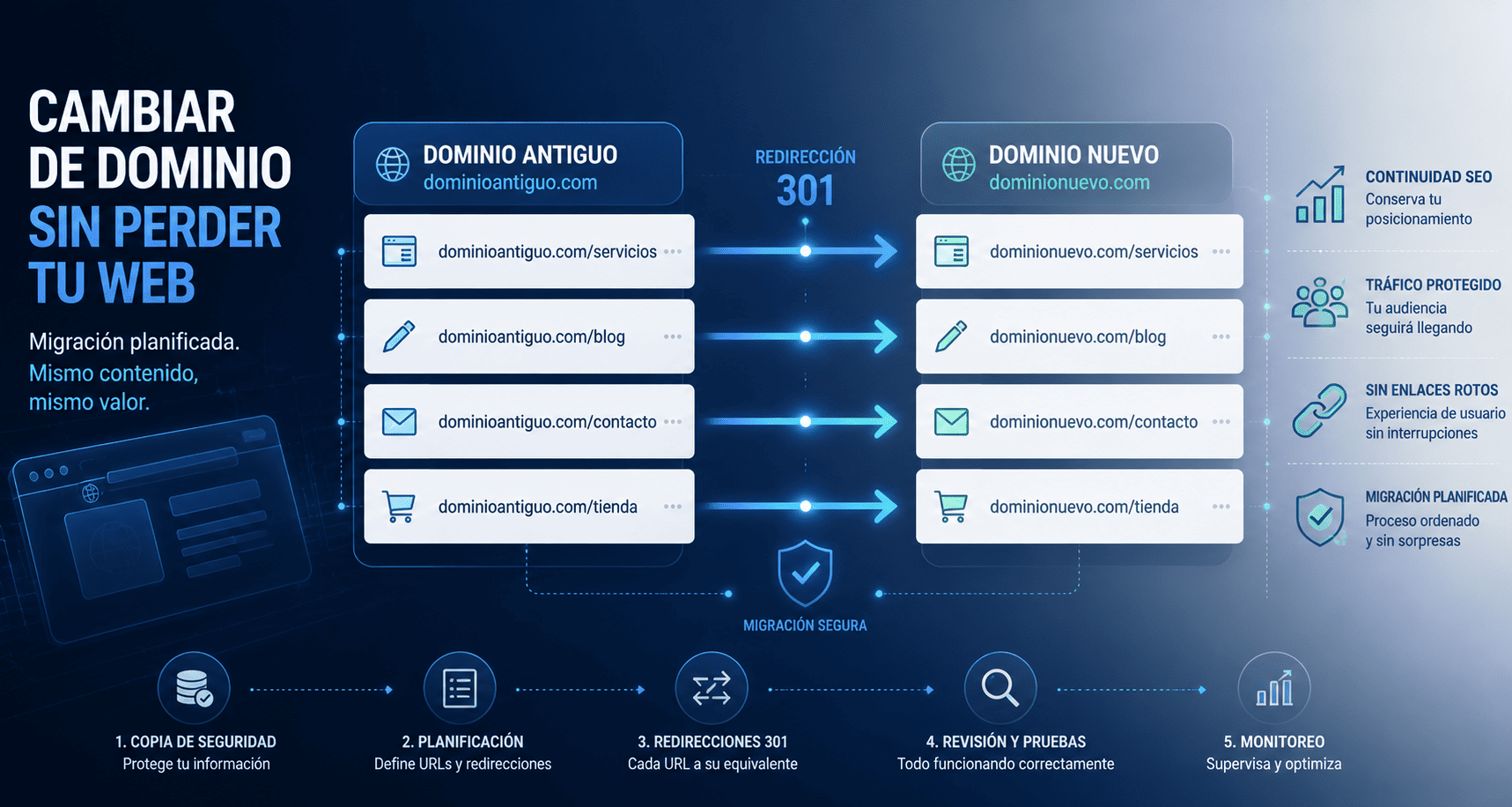
Changing domain may seem simple: register a new name, point it to your website and carry on as usual.
But in practice, a domain change affects many more elements than it may seem.
It does not only change the address users use to access your site. It can also affect SEO positioning, organic traffic, external links, hosting configuration, corporate email, forms, images, internal files and the way Google interprets your website.
That is why changing domain should never be done without planning.
With good preparation, the process can be carried out in an orderly way and without major issues. Without it, the risk is clear: losing visits, visibility and part of the digital work built up over years.
Before changing domain, understand what you are moving
A domain is not just a web address. It is the gateway to your entire digital presence.
That is why, before making any changes, it is important to understand which elements depend on it and how they are connected.
Changing the domain of a simple corporate website is not the same as migrating an online store, a website with many indexed pages or a site connected to external tools. The more complex the website, the more important it is to have a clear overview before starting.
The first step is to check where the current domain is registered, which hosting service the website uses, how the site is built and which URLs need to be maintained or redirected.
It is also important to check whether the domain is used for corporate email, advertising campaigns, analytics tools, social media, payment platforms or external integrations.
The better you understand the starting point, the easier it will be to avoid errors during the migration.
Make a backup before touching anything
Before starting any technical change, there is one step that should never be skipped: making a complete backup.
This backup should include the website files, database, CMS configuration, images, documents and any element needed to restore the site if something does not go as expected.
For websites built with WordPress, for example, saving only the files is not enough. It is also essential to preserve the database, because that is where posts, pages, users, settings and much of the dynamic content are stored.
The backup is your return point.
If an error appears during the migration, having an up-to-date backup allows you to go back, fix the issue and avoid losing information.
Plan the migration before carrying it out
One of the most common mistakes when changing domain is starting the migration without a clear roadmap.
Changing domain can involve several technical actions: moving the website to another hosting service, changing DNS, updating internal paths, modifying links, configuring SSL certificates, reviewing databases or adapting the CMS to the new domain.
That is why, before carrying out the change, it is useful to prepare a migration plan.
This plan should define what will be migrated, when it will be done, who will carry it out, which tools will be used and how everything will be checked after the change.
It is also advisable to carry out the migration during a period of low traffic, especially if the website has commercial activity, contact forms or lead-generation elements.
The goal is not just to move the website. It is to reduce risk and prevent users from encountering errors during the process.
Review all important URLs
If the website already has published content, it is essential to identify which URLs exist and which ones need to keep an equivalent version on the new domain.
This is especially important if there are pages ranking on Google, blog articles with traffic, active landing pages or URLs linked from other websites.
Before the migration, it is worth creating a list of the main pages and deciding what their new address will be.
For example:
olddomain.com/services
should lead to:
newdomain.com/services
This prior work helps prevent broken links and makes it easier to configure redirects correctly.
301 redirects are essential
If you change domain, 301 redirects are one of the most important steps in the whole process.
A 301 redirect tells browsers and search engines that a URL has permanently moved to a new address.
Without these redirects, users entering from old links may land on error pages. Google may also interpret that the content has disappeared, which can affect positioning.
Whenever possible, redirects should be set up URL by URL, avoiding generic redirects from every old URL to the homepage.
In other words, if an old page had specific content, it should lead to its equivalent on the new domain.
This helps preserve traffic, SEO authority and user experience.
Update internal links, images and resources
Redirects are essential, but they should not be the only solution.
After changing domain, it is also important to review the internal links on the website so they point directly to the new domain.
This includes menus, buttons, links within content, images, downloadable files, forms, scripts, stylesheets and any resource that may still be calling the old domain.
On some websites, especially large sites or those built with WordPress, old paths may remain inside the database. If they are not corrected, errors, mixed content or resources that do not load properly may appear.
A well-executed migration does not only redirect: it also cleans, updates and prepares the website to work correctly on the new domain.
Do not forget the SSL certificate
The new domain must have a correctly installed SSL certificate.
This allows the website to load under HTTPS and prevents security warnings in the browser.
If the certificate is not properly configured, users may see “not secure” messages. This directly affects trust, conversion and the professional perception of the brand.
SSL is also important for SEO and for the correct functioning of forms, online payments and other sensitive website elements.
Notify Google of the change
Once the migration has been completed, it is important to help Google understand that the website has changed domain.
To do this, the new domain should be configured in Google Search Console, checking that Google can crawl the new URLs correctly.
It is also advisable to submit the new sitemap and check that the 301 redirects work as they should.
If the change involves a full domain migration, Search Console allows you to use the change of address tool, provided the necessary conditions are met.
This step helps speed up Google’s understanding of the change and reduces the risk of losing organic visibility.
Test everything after the migration
Changing domain does not end when the website loads at the new address.
After the change, everything needs to be checked carefully.
It is important to review the main pages, menus, forms, images, mobile versions, internal links, buttons, downloadable documents, analytics tags and conversions.
It is also advisable to crawl the website with a technical tool to detect 404 errors, incorrectly configured redirects or resources that still point to the previous domain.
A full review after the migration helps detect problems before they affect users or search engines.
Changing domain does not have to mean starting from zero
Changing domain may be necessary for many reasons: a rebrand, internationalisation, a strategic naming improvement, a company merger or a digital reorganisation.
The problem is not changing.
The problem is doing it without a clear strategy.
With a backup, proper planning, correctly configured redirects, an SEO review and post-migration testing, it is possible to make the change safely and minimise its impact.
Because changing domain does not mean starting from zero.
If it is done properly, you can preserve your website, your content, your traffic and much of the digital value you have already built.
Before doing it, make sure you review your domain, hosting, URLs, redirects and all the elements that depend on your website.
At Entorno, we can help you manage domains, review the technical configuration and prepare the change so your website continues to work correctly.
Because changing domain does not have to make you lose positioning.
The important thing is to do it with a plan.