










Corporate email also depends on SSL/TLS certificates
July 28, 2026 | Jordi Genescà Prat
Certificados SSLCertGuardian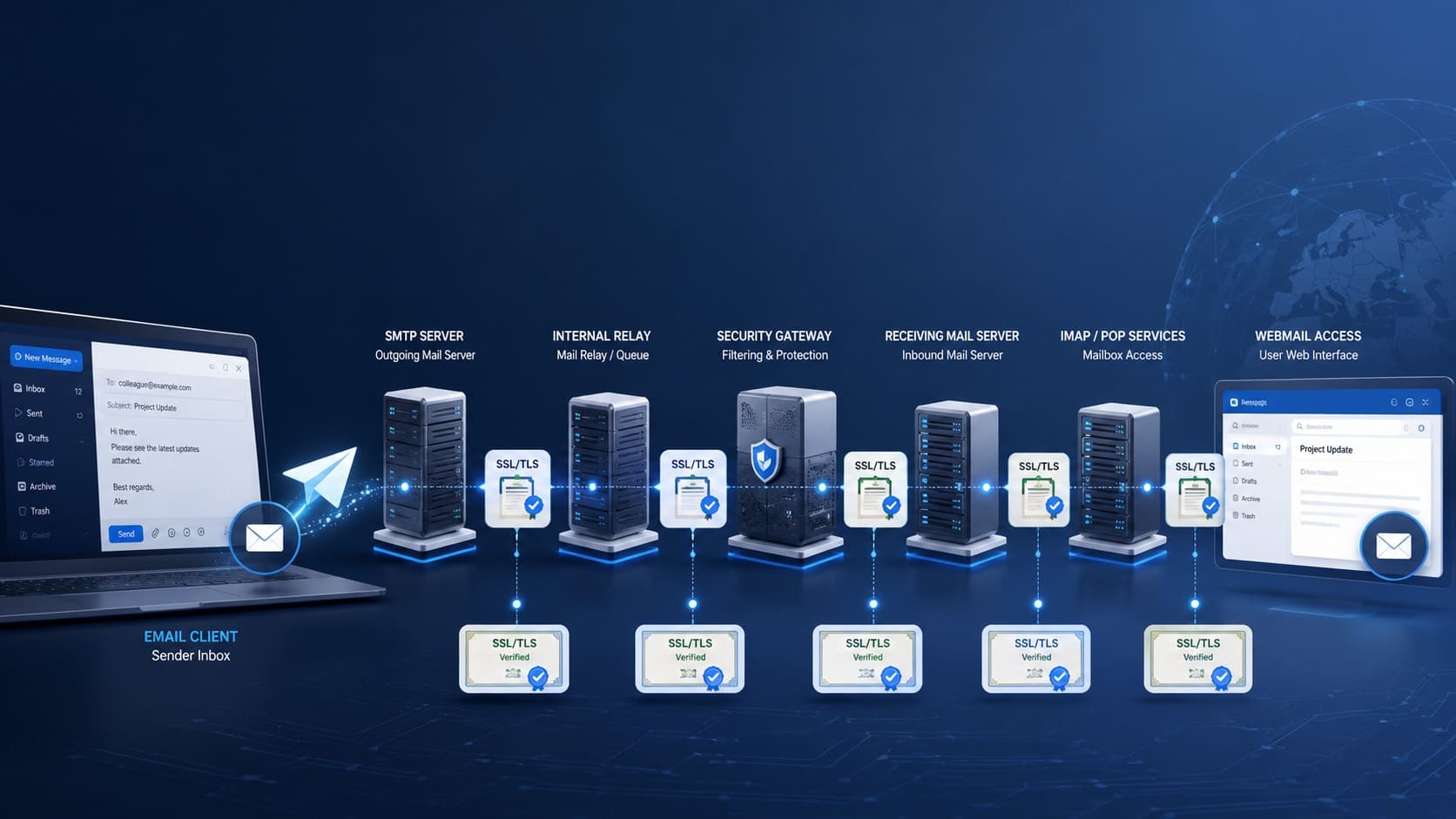
When people talk about SSL/TLS certificates, many companies automatically think about their website.
The browser padlock, the ecommerce site, the private area or the contact form.
And that makes sense. The website is usually the most visible environment where an expired or misconfigured certificate has an immediate impact.
But SSL/TLS certificates do not only protect websites.
They can also be involved in critical services related to corporate email: SMTP, IMAP, POP, webmail, internal relays, security gateways, hybrid connectors, load balancers or intermediary servers.
And this is often overlooked.
Many companies check the certificate of their main domain, but they do not always know which certificates are involved in the real operation of their email infrastructure.
The problem is that, when one of these certificates expires or is misconfigured, the impact can affect users, applications, integrations and internal processes.
That is why corporate email should also be part of any serious SSL/TLS certificate management strategy.
Email does not depend on a single connection
For many users, email is simply Outlook, Gmail, Apple Mail, Thunderbird or a web interface from which they send and receive messages.
But behind the scenes, corporate email can depend on several connections.
A user may check their mailbox through IMAP or POP. They may send messages through SMTP. A company may have its own webmail. An internal application may send notifications through a relay. An ecommerce site may send order confirmations. A CRM may send commercial emails. A support system may generate automatic alerts. A gateway may analyse messages before delivering them.
Each of these pieces can be part of the email flow.
And some of them may need SSL/TLS certificates to establish secure connections.
That is why, even if email appears to be centralised in a single platform, in practice it can depend on a broader infrastructure.
What role do SSL/TLS certificates play in email?
SSL/TLS certificates help protect connections between systems.
In the context of email, this can apply when a user connects to a server to check their messages, when an application sends emails via SMTP, when webmail loads in the browser, when a relay accepts messages from internal systems or when a security gateway communicates with other servers.
In all these cases, TLS helps encrypt the connection and reduce the risk of information travelling exposed.
This should not be confused with other email security mechanisms such as SPF, DKIM, DMARC or BIMI.
SPF, DKIM and DMARC help authenticate the domain and reduce spoofing. BIMI helps reinforce the brand’s visual identity in compatible email clients.
TLS, on the other hand, focuses on protecting the connection through which the information travels.
They are different layers.
And that is precisely why none of them should be forgotten.
A company may have its domain authentication properly configured and still have forgotten SSL/TLS certificates in email services, relays, gateways or applications that are also part of its daily operations.
Where corporate email certificates can be found
SSL/TLS certificates associated with email can be found in more places than it may seem.
They can be installed on SMTP servers used to send messages. They can also be used in IMAP or POP services, which allow users to access mailboxes from email clients. They may be present in webmail, if the company offers email access from a browser.
They can also be found in internal relays that receive messages from corporate applications, security gateways that filter email traffic, antispam appliances, encryption tools, archiving systems, load balancers, firewalls, hybrid connectors or intermediary servers.
In companies with more complex infrastructures, these certificates may be spread across different environments.
Part of the email service may depend on Microsoft 365 or Google Workspace. Another part may still be linked to internal servers, external providers, internal applications, cloud services, marketing tools, CRMs, ERPs or support platforms.
The result is that corporate email does not always depend on a single point.
And neither do the certificates involved in that ecosystem.
What can happen if an email certificate expires?
When a certificate associated with corporate email expires, the impact can vary depending on the affected service.
In some cases, users may see security warnings in their email client. The system may indicate that the certificate is not valid, has expired, does not match the server name or that the connection cannot be trusted.
This can create doubts, generate queries for the technical team and reduce confidence in the service.
In other cases, the problem may affect email sending.
An application may stop sending notifications. An ecommerce site may fail to send order confirmations. A CRM may fail to send messages. An alerting system may stop delivering important notifications. A support platform may fail to send updates to customers.
It can also affect email reception, filtering or routing.
A gateway may reject connections. A relay may stop accepting messages. An intermediary server may generate errors. An integration may be interrupted.
The most complex part is that, in many cases, the problem is not immediately identified as a certificate-related incident.
From the outside, it may look like an email client failure, an SMTP configuration issue, a provider outage, an authentication error or a connectivity incident.
But the root cause may be an expired, incorrectly installed or unrecognised SSL/TLS certificate.
What happens when an SSL/TLS certificate expires is not always limited to a website: it can also affect internal services, applications and critical flows such as corporate email.
The problem is not always expiry
Expiry is not the only risk.
A certificate may still be valid, but incorrectly configured.
It may have been issued for a name that does not match the server used by email clients. The intermediate chain may be missing. It may have been installed on the main server, but not on the relay. It may have been renewed, but not deployed on the gateway. An old certificate may still be active in an intermediary layer.
In these cases, the incident may be partial.
Some users may connect without problems, while others receive errors. One application may send emails correctly, while another does not. Webmail may work, but the desktop client may display warnings. The main server may be correctly configured, but an intermediary system may still be using an obsolete certificate.
These types of problems are particularly inconvenient because they do not always cause a clear and easily detectable outage.
Sometimes email works “partially”.
And that makes diagnosis more difficult.
Why these certificates often fall outside the inventory
SSL/TLS certificates linked to email often fall outside the inventory for a simple reason: they are not always visible.
The certificate of a public website can be checked easily from the browser. If it fails, the warning is obvious. If it expires, the impact is usually detected quickly.
But certificates associated with email may be located in less exposed services.
An internal SMTP server. A relay used only by certain applications. A gateway configured years ago. A hybrid connector. An IMAP service used by a small number of users. An automated sending system. An external tool integrated with the company’s infrastructure.
In addition, corporate email is often split across several areas of responsibility.
The systems team, security team, hosting provider, email provider, support department, an external integrator or the person responsible for a specific application may all be involved.
When there is no centralised view, it is easy for some certificates to remain documented in old spreadsheets, in different control panels or directly in configurations that nobody reviews until they fail.
The problem is not usually that email is considered unimportant.
The problem is the lack of visibility over all the pieces that support it.
The risk increases in hybrid environments
Many companies use platforms such as Microsoft 365 or Google Workspace to manage their main email service.
This can simplify an important part of operations, but it does not always eliminate all SSL/TLS certificates related to email.
A company may keep internal relays for corporate applications, external security gateways, hybrid connectors, internal servers for specific services or marketing, CRM, ERP, ticketing or ecommerce platforms that send emails via SMTP.
In these environments, some certificates may be managed by the main provider. Others may depend on the internal team. Others may be handled by third parties. Others may be installed on legacy systems that are still required for specific processes.
That is why assuming that “email is in the cloud” does not always mean that all certificates associated with email are under control.
In many cases, intermediary pieces still exist and need supervision.
This is similar to what happens with SSL/TLS certificate management in cloud and multi-cloud environments: the more distributed the infrastructure, the more important centralised visibility becomes.
How CertGuardian helps manage certificates linked to email
To control SSL/TLS certificates associated with corporate email, the first step is to have an inventory.
Knowing which certificates exist, where they are installed, which service they protect, when they expire, who manages them, which systems depend on them and whether they have been renewed and deployed correctly.
With CertGuardian, companies can centralise the management of their SSL/TLS certificates, monitor their status, configure alerts, automate renewals and maintain traceability over renewal, installation and change processes.
This helps prevent certificates linked to email from falling outside the radar.
Especially in environments with SMTP, IMAP, POP, webmail, relays, gateways, connectors, intermediary servers, external providers or hybrid infrastructures.
The advantage is not only in renewing certificates.
It is in having a more complete view of all the certificates that are part of the company’s digital infrastructure, including those that are not visible from a public website but can affect critical services such as corporate email.
That is why automating SSL/TLS certificates without losing control also means maintaining inventory, monitoring, alerts and traceability over certificates that are not always obvious.
Centralise SSL/TLS certificate management with CertGuardian.
Email is also part of SSL/TLS management
Email is one of the most critical services for any company.
It is used to communicate with customers, suppliers, employees, platforms, applications and internal systems.
That is why its security and availability do not only depend on antispam filters, domain authentication or phishing protection policies.
They also depend on the secure connections that allow messages to be sent, received, accessed, filtered and processed.
And those connections can rely on SSL/TLS certificates.
If these certificates fall outside the inventory, expire or are misconfigured, the impact can reach users, applications, relays, gateways, integrations and business processes.
That is why corporate email should also be part of centralised SSL/TLS certificate management.
Because certificates do not only protect the web.
They also support services that many companies use every day without seeing them.